状态模式

状态模式(State Pattern)

状态模式是一种行为模式,能让对象通过修改他们的“状态”,在运行时改变自己的行为。“状态”是指描述给定对象在给定时间如何行为的数据集。

状态模式包含以下三种类型:
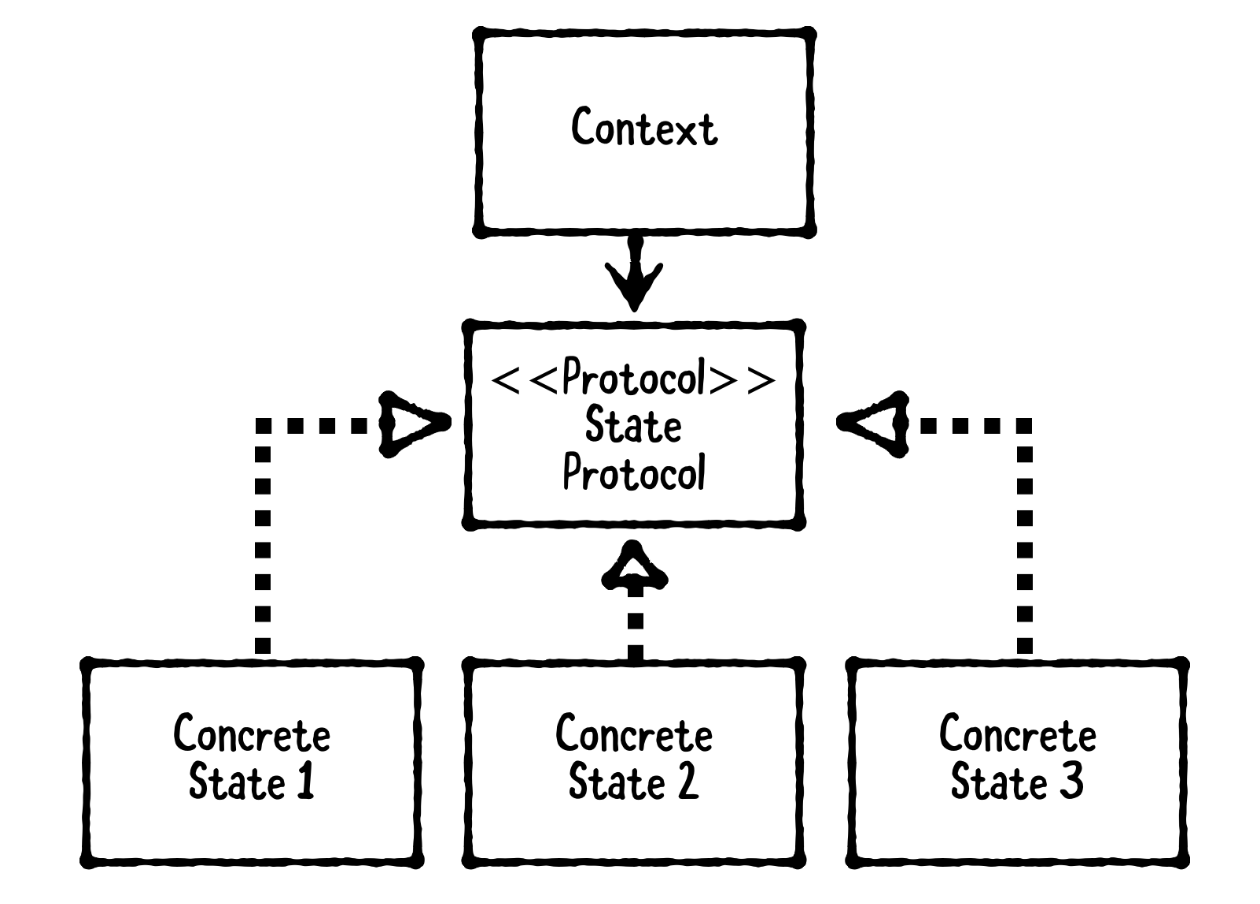
  1. context:具有当前状态且其行为会发生变化的对象。
  2. state protocol:定义了必需的方法和属性。开发人员通常用基类代替协议。这样,他们就可以在基类中定义属性。

    即使使用了基类,也不能直接实例化它。相反,它的定义仅是为了能够被子类化。

  3. concrete state:遵循state protocol或继承自基类。context会持有它的当前状态,但不知道具体的状态类型。context会使用多态来改变行为:concrete state定义了context的行为。如果你想要一个新的行为,定义一个新的concrete state。

应该在哪里修改当前状态呢?是在context里修改?还是在concrete state修改?还是在其他什么地方修改呢?状态模式并没有告诉你应该在哪里写状态修改逻辑,这视实际情况决定。

什么时候应该使用状态模式

使用状态模式来创建一个系统,该系统在其生命周期内会在两个或多个状态之间进行更改。状态可以限制数量(“封闭”集),也可以不受限制(“开放”集)。例如,可以使用一组封闭的“交通信号灯状态”来定义交通信号灯。在最简单的情况下,它会从绿色变为黄色,再变成红色,最后变回绿色。

一个动画引擎可以定义为一组开放的“动画状态”。它具有无限的旋转,平移和其他动画。

开放式和封闭式的状态模式的都使用多态来更改行为。结果,您通常可以使用此模式来消除switch和if-else语句。

无需在context中管理复杂的状态,而是将调用传递到当前状态中。如果你有一个包含多个switch或if-else语句的类,请尝试使用状态模式来定义它。这样你就可能会创建一个更灵活,更容易维护的系统。

状态模式和策略模式的区别

策略模式更多的是解决不同状态下,单行为的变化;而状态模式则是解决不同状态下多行为的变化。

使用举例

实现上文提到过的交通灯系统

1.定义context

1
2
3
4
5
6
7
8
9
10
11
12
13
14
15
16
17
18
19
20
21
22
23
24
25
26
27
28
29
30
31
32
33
34
35
36
37
38
39
40
41
42
43
44
45
46
47
48
49
50
51
52
53
54
55
56
57
58
59
60
61
62
63
64
65
66
67
68
69
70
71
72
73
74
75
76
77
78
79
80
// MARK: - Context
public class TrafficLight: UIView {
// MARK: - Instance Properties
public private(set) var canisterLayers: [CAShapeLayer] = []
public private(set) var currentState: TrafficLightState
public private(set) var states: [TrafficLightState]
// MARK: - Object Lifecycle
@available(*, unavailable,
message: "Use init(canisterCount: frame:) instead")
public required init?(coder aDecoder: NSCoder) {
fatalError("init(coder:) is not supported")
}
public init(canisterCount: Int = 3,
frame: CGRect =
CGRect(x: 0, y: 0, width: 160, height: 420),
states: [TrafficLightState]) {
guard !states.isEmpty else {
fatalError("states should not be empty")
}
self.currentState = states.first!
self.states = states
super.init(frame: frame)
backgroundColor =
UIColor(red: 0.86, green: 0.64, blue: 0.25, alpha: 1)
createCanisterLayers(count: canisterCount)
transition(to: currentState)
}
private func createCanisterLayers(count: Int) {
let paddingPercentage: CGFloat = 0.2
let yTotalPadding = paddingPercentage * bounds.height
let yPadding = yTotalPadding / CGFloat(count + 1)
let canisterHeight = (bounds.height - yTotalPadding) / CGFloat(count)
let xPadding = (bounds.width - canisterHeight) / 2.0
var canisterFrame = CGRect(x: xPadding,
y: yPadding,
width: canisterHeight,
height: canisterHeight)
for _ in 0 ..< count {
let canisterShape = CAShapeLayer()
canisterShape.path = UIBezierPath(ovalIn: canisterFrame).cgPath
canisterShape.fillColor = UIColor.black.cgColor
layer.addSublayer(canisterShape)
canisterLayers.append(canisterShape)
canisterFrame.origin.y += (canisterFrame.height + yPadding)
}
}
public func transition(to state: TrafficLightState) {
removeCanisterSublayers()
currentState = state
currentState.apply(to: self)
nextState.apply(to: self, after: currentState.delay)
}
private func removeCanisterSublayers() {
canisterLayers.forEach {
$0.sublayers?.forEach {
$0.removeFromSuperlayer()
}
}
}
public var nextState: TrafficLightState {
guard let index = states.index(where: { $0 === currentState }),
index + 1 < states.count else {
return states.first!
}
return states[index + 1]
}
}

2.定义state protocol

1
2
3
4
5
6
7
8
9
10
11
12
13
14
15
16
17
18
19
20
// MARK: - State Protocol
public protocol TrafficLightState: class {
// MARK: - Properties
var delay: TimeInterval { get }
// MARK: - Instance Methods
func apply(to context: TrafficLight)
}
extension TrafficLightState {
public func apply(to context: TrafficLight, after delay: TimeInterval) {
let queue = DispatchQueue.main
let dispatchTime = DispatchTime.now() + delay
queue.asyncAfter(deadline: dispatchTime) { [weak self, weak context] in
guard let self = self, let context = context else { return }
context.transition(to: self)
}
}
}

3.创建concrete states

1
2
3
4
5
6
7
8
9
10
11
12
13
14
15
16
17
18
19
20
21
22
23
24
25
26
27
28
29
30
31
32
33
34
35
36
37
38
39
40
41
42
43
44
45
46
47
48
49
50
51
52
53
54
55
56
57
58
59
60
61
// MARK: - Concrete States
public class SolidTrafficLightState {
// MARK: - Properties
public let canisterIndex: Int
public let color: UIColor
public let delay: TimeInterval
// MARK: - Object Lifecycle
public init(canisterIndex: Int,
color: UIColor,
delay: TimeInterval) {
self.canisterIndex = canisterIndex
self.color = color
self.delay = delay
}
}
extension SolidTrafficLightState: TrafficLightState {
public func apply(to context: TrafficLight) {
let canisterLayer = context.canisterLayers[canisterIndex]
let circleShape = CAShapeLayer()
circleShape.path = canisterLayer.path!
circleShape.fillColor = color.cgColor
circleShape.strokeColor = color.cgColor
canisterLayer.addSublayer(circleShape)
}
}
extension SolidTrafficLightState {
public class func greenLight(
color: UIColor =
UIColor(red: 0.21, green: 0.78, blue: 0.35, alpha: 1),
canisterIndex: Int = 2,
delay: TimeInterval = 1.0) -> SolidTrafficLightState {
return SolidTrafficLightState(canisterIndex: canisterIndex,
color: color,
delay: delay)
}
public class func yellowLight(
color: UIColor =
UIColor(red: 0.98, green: 0.91, blue: 0.07, alpha: 1),
canisterIndex: Int = 1,
delay: TimeInterval = 0.5) -> SolidTrafficLightState {
return SolidTrafficLightState(canisterIndex: canisterIndex,
color: color,
delay: delay)
}
public class func redLight(
color: UIColor =
UIColor(red: 0.88, green: 0, blue: 0.04, alpha: 1),
canisterIndex: Int = 0,
delay: TimeInterval = 2.0) -> SolidTrafficLightState {
return SolidTrafficLightState(canisterIndex: canisterIndex,
color: color,
delay: delay)
}
}

4.使用状态模式

1
2
3
4
let greenYellowRed: [SolidTrafficLightState] =
[.greenLight(), .yellowLight(), .redLight()]
let trafficLight = TrafficLight(states: greenYellowRed)
PlaygroundPage.current.liveView = trafficLight

其他例子

  1. oc中的状态模式:https://juejin.im/post/5a3ca75551882515945ac5ff
  2. 售卖机例子:https://www.cnblogs.com/xiaofeixiang/p/5135479.html
  3. 在工程中试玩状态模式:https://www.cnblogs.com/R0SS/p/5408544.html